


TL;DR:
- Managing a business move involves careful planning across seven phases to minimize downtime and costs. Proper workflow mapping and fixing broken processes before automating help ensure a smooth relocation. Post-move stabilization is critical, requiring ongoing testing and feedback to resolve issues effectively.
A business moving workflow is the structured, phase-by-phase process of managing every task in a commercial relocation to keep operations running and downtime to a minimum. Industry standards call for seven distinct phases spanning 12 months of preparation and 60–90 days of post-move stabilization. Managers who treat a commercial move as a project management workflow, rather than a single event, consistently see fewer cost overruns, fewer missed deadlines, and faster return to full productivity. This guide walks you through each phase, the most common failure points, and the tools that keep your team on track.
What are the essential phases of a business moving workflow?
A well-structured commercial relocation follows seven phases, each with defined tasks and owners. Compressing these phases or skipping them entirely is the single most common cause of move-day chaos.

Phase 1: Strategic planning (12 months out). Define the move’s scope, budget, and timeline. Assign a dedicated move coordinator with authority over IT, HR, Facilities, and Finance decisions. A single move coordinator with clear ownership dramatically improves move success. Without one, tasks fall through the gaps between departments.
Phase 2: Site selection and lease review (10–11 months out). Evaluate the new location for power capacity, network infrastructure, and building access. Read every clause in your current lease. Lease decommissioning clauses often require returning space to bare walls, and those costs can exceed your moving fees. Budget for them now, not after you sign the new lease.
Phase 3: Vendor coordination (8–10 months out). Issue RFPs to commercial movers, IT vendors, and furniture suppliers. Lock in contracts early. For interstate moving across state lines, confirm that your mover holds the required FMCSA licensing and insurance before signing anything.
Phase 4: IT and infrastructure planning (6–9 months out). Order internet service and cabling immediately. IT connectivity setup can take 60–90 days or longer. A delay here pushes your entire move-in date back, regardless of how well everything else is running.
Phase 5: Packing and decommissioning (4–6 weeks out). Label all equipment by department and destination floor. Decommission servers, archive paper records, and dispose of obsolete hardware. This phase also includes building management notices, which typically require 60–90 days of advance notice.
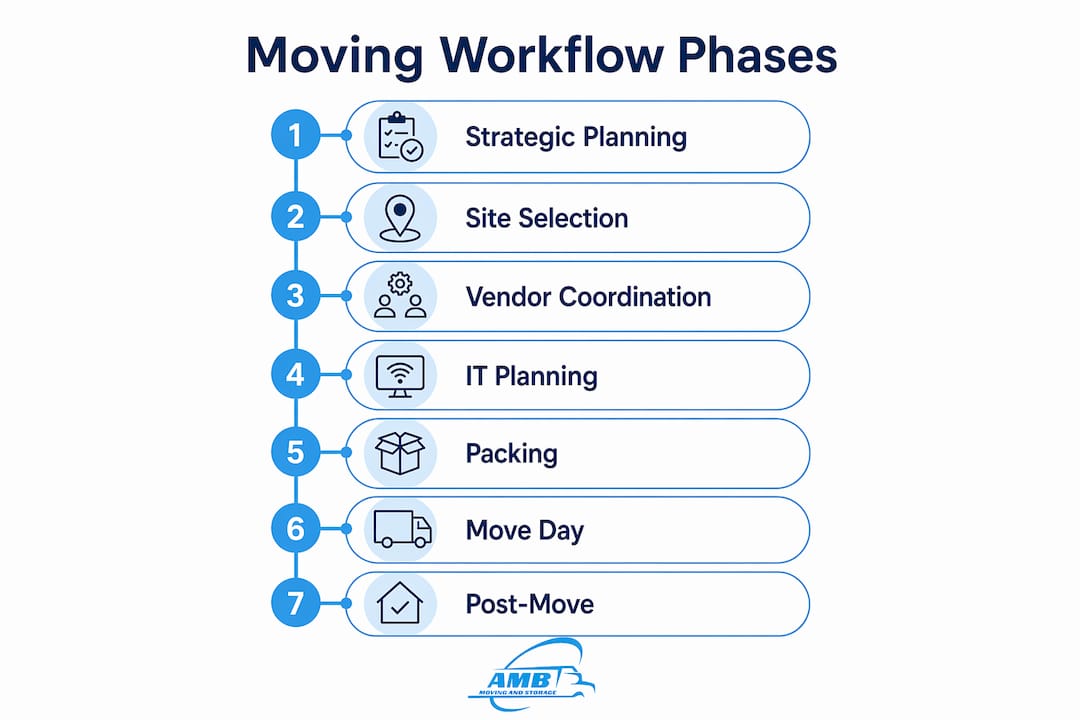
Phase 6: Move execution (move day). Execute the physical move according to a minute-by-minute schedule. Run IT connectivity checks before staff arrive. Verify that all critical systems are live before declaring the space operational.
Phase 7: Post-move stabilization (60–90 days after move). Test all systems, gather staff feedback, and resolve outstanding punch-list items. This phase is not optional. Skipping it leaves unresolved issues that compound over weeks.
| Phase | Timeline | Key deliverable |
|---|---|---|
| Strategic planning | 12 months out | Budget, scope, coordinator assigned |
| Site selection and lease review | 10–11 months out | Signed lease with decommissioning costs budgeted |
| Vendor coordination | 8–10 months out | Contracts signed, FMCSA compliance confirmed |
| IT and infrastructure | 6–9 months out | Internet and cabling ordered |
| Packing and decommissioning | 4–6 weeks out | All equipment labeled and archived |
| Move execution | Move day | Systems live before staff arrive |
| Post-move stabilization | 60–90 days after | Punch list closed, feedback gathered |
How can you map and optimize your moving operations strategy?
Workflow mapping is the process of documenting every task, owner, and dependency in your relocation plan before the move begins. Most managers skip this step and pay for it in duplicated effort and missed handoffs.
Start by listing every task your team currently performs during a move. Group tasks by phase and department. Then draw the sequence: which tasks must finish before the next one can start? This visual map reveals bottlenecks that are invisible in a flat checklist. A project management workflow tool like Microsoft Project, Asana, or Smartsheet makes this mapping faster and easier to share across teams.
The most critical rule in workflow optimization is this: fix broken processes before you automate them. Automating a flawed process only produces flawed results faster. If your current IT decommissioning process requires three manual approval steps that slow everything down, redesign the approval chain first. Then automate the notifications.
Once your core process is clean, apply the 80/20 rule. Standardize 80% of core workflows and retain 20% flexibility for exceptions. A rigid process that cannot adapt to a delayed elevator booking or a vendor no-show will break under real conditions. Built-in flexibility is not a weakness. It is a design feature.
- Document every task with a named owner, not a department. “IT team” is not an owner. “Marcus Chen, IT Director” is.
- Map dependencies explicitly. If furniture delivery must precede workstation setup, write that down.
- Identify your longest lead-time tasks first. IT connectivity and building permits drive your entire timeline.
- Review the map with every department head before finalizing it. They will catch gaps you missed.
- Set a weekly review cadence. Targeted, deliberate improvements deliver better results than attempting a complete overhaul at once.
Pro Tip: Run a tabletop simulation of your move-day workflow with department heads six weeks before the move. Walk through every handoff on paper. You will find at least three gaps that your checklist missed.
What are common pitfalls in business moving workflows?
The most expensive mistakes in commercial relocations are predictable. They appear in the same phases, for the same reasons, on nearly every move that lacks a formal workflow.
Financial surprises from lease obligations. Building management typically requires 60–90 days of advance notice before you vacate. Miss that window and you pay rent on two spaces simultaneously. Hidden decommissioning costs like restoring walls, removing cabling, and disposing of fixtures can exceed your total moving budget. Add a line item for decommissioning in your budget at the start of Phase 1, not after you receive the invoice.
IT delays that push move-in dates. Ordering internet service in the final month before a move is a guaranteed delay. Providers in commercial buildings often require 60–90 days for provisioning. If your staff cannot connect on day one, productivity losses accumulate quickly. Order connectivity in Phase 4, not Phase 5.
Unclear task ownership. When a task belongs to “everyone,” it belongs to no one. Missed tasks in commercial moves almost always trace back to shared ownership with no single accountable person. Every item on your move checklist needs one name attached to it.
- Assign a backup owner for every critical task. If your move coordinator is unavailable on move day, someone else must have the authority to make decisions.
- Build a contingency budget of at least 10–15% above your estimated moving costs to absorb surprises.
- Send a formal communication plan to all staff at least 30 days before the move. Include the new address, parking details, IT login procedures, and the first day of full operations.
A commercial relocation without a formal communication plan creates confusion that outlasts the move itself. Staff who do not know where to report, how to connect, or who to call for problems will lose productive hours on day one.
For long-distance moving across state lines, regulatory compliance adds another layer. Confirm your mover’s FMCSA registration, liability coverage, and binding estimate terms before the truck is loaded.
Which tools support effective moving operations management?
The right tools reduce manual coordination and give managers a real-time view of where the move stands. The wrong tools add complexity without clarity.
Project management platforms like Asana, Monday.com, and Smartsheet handle task assignment, dependency tracking, and deadline alerts. They work well for the planning phases. For move-day execution, a shared digital checklist with mobile access is more practical than a desktop platform. Every team lead should be able to update task status from the floor.
Digital workflows in hybrid and remote environments achieve better optimization results than paper-based processes. The reason is straightforward: digital tasks are easier to monitor, reassign, and audit. When a task slips, a digital system flags it immediately. A paper checklist flags it when someone notices.
| Tool category | Best use case | Key benefit |
|---|---|---|
| Project management platform | Phase planning and dependency tracking | Centralized task visibility |
| Shared digital checklist | Move-day execution | Real-time status updates |
| Communication platform | Staff and vendor updates | Reduces missed notifications |
| IT monitoring software | Connectivity verification | Confirms systems are live |
Pro Tip: Set up a dedicated communication channel (Slack, Microsoft Teams, or similar) exclusively for move-day coordination. Keep it separate from regular work channels so critical updates do not get buried.
Stakeholder training matters as much as the tools themselves. A platform that your team does not use is not a solution. Run a 30-minute walkthrough of your project management tool with every department lead at least four weeks before the move. Adoption before move day prevents confusion during it.
How to execute your move day and post-move stabilization
Move day is the phase where planning either pays off or falls apart. A well-run move day follows a written schedule, not improvised decisions.
- Confirm IT connectivity at the new location before any staff arrive. A technical dry run 48 hours before move day catches cabling and configuration issues while there is still time to fix them.
- Brief every department lead on their specific responsibilities at a morning standup. Each lead should have a printed copy of their task list and the move coordinator’s direct contact.
- Execute physical moves by department, not by floor. Moving one complete department at a time reduces the risk of mixed equipment and missing inventory.
- Run a systems check at the end of move day. Verify that phones, internet, printers, and access control systems are operational before the crew leaves.
- Document every unresolved issue in a shared punch list before the end of day one.
Post-move stabilization runs for 60–90 days and covers more ground than most managers expect. The moving coordinator role does not end on move day. It continues through the stabilization phase, tracking open items and driving them to resolution.
- Gather staff feedback in the first two weeks. Identify recurring complaints and address them before they become permanent frustrations.
- Test all IT systems under full load, not just basic connectivity. Video conferencing, VPN access, and cloud storage all behave differently at scale.
- Review your vendor invoices against your contracts within 30 days. Billing disputes are easier to resolve while the move is recent.
- Schedule a formal post-move review at the 90-day mark. Document what worked, what failed, and what you would change. This record becomes the foundation for your next relocation plan.
Key takeaways
A successful business moving workflow requires seven defined phases, a single accountable coordinator, and a commitment to fixing processes before automating them.
| Point | Details |
|---|---|
| Start 12 months early | Seven phases require 12 months of preparation and 60–90 days of post-move stabilization. |
| Assign one coordinator | A single move coordinator with cross-department authority prevents missed tasks and vendor gaps. |
| Fix before you automate | Map and repair broken processes before applying automation to avoid compounding errors. |
| Budget for hidden costs | Lease decommissioning and IT provisioning costs regularly exceed initial estimates. |
| Treat stabilization as a phase | Post-move testing and feedback over 60–90 days resolves issues before they become permanent. |
What I’ve learned from managing complex commercial moves
The most underestimated phase in any commercial relocation is post-move stabilization. Every manager I have worked with treats move day as the finish line. It is not. The real work begins when staff arrive at the new space and discover that the printer on floor three is not on the network, the conference room booking system is down, and the break room has no power outlets near the coffee station.
Early planning is not a preference. It is the only thing that separates a smooth move from a costly one. The seven-phase framework exists because every phase has dependencies that cannot be compressed. You cannot order internet service in week two and expect it live by week four. You cannot skip the lease decommissioning review and then act surprised by a six-figure restoration bill.
The advice I give every manager is this: resist the urge to automate before you map. I have seen teams spend weeks building automated task notifications for a workflow that had three redundant approval steps baked in. The automation made the redundancy faster, not better. Map first. Fix the process. Then automate the clean version.
Communication is the one area where over-investment never hurts. Send one more update than you think is necessary. Hold one more briefing than feels required. The teams that struggle most after a move are the ones whose managers assumed everyone read the email.
— AMB
How Ambmovingservices supports your commercial relocation
Ambmovingservices specializes in commercial moving for businesses relocating across state lines, with dedicated move coordinators who manage vendor communication, logistics scheduling, and compliance with FMCSA regulations from the first planning call through post-move sign-off.
Every commercial client receives a structured move plan aligned with the seven-phase framework, covering everything from lease timeline coordination to IT cutover support. For businesses managing nationwide moving across multiple locations, Ambmovingservices provides centralized project oversight so your internal teams stay focused on operations, not logistics. Request a quote and get a move plan built around your specific timeline and workflow requirements.
FAQ
What is a business moving workflow?
A business moving workflow is a structured, phase-by-phase process for managing every task in a commercial relocation. It covers planning, vendor coordination, IT setup, physical execution, and post-move stabilization.
How many phases does a commercial relocation typically require?
A commercial relocation for 200–500 employees covers seven distinct phases over 12 months of preparation, followed by 60–90 days of post-move stabilization and testing.
Why does IT setup take so long in a business move?
Internet provisioning and cabling in commercial buildings can take 60–90 days or longer. Ordering connectivity in the final weeks before a move almost always delays the move-in date.
What is the biggest financial risk in a commercial relocation?
Lease decommissioning clauses are the most common source of unexpected costs. These clauses may require restoring the space to bare walls, and the associated costs can exceed the total moving budget if not planned for early.
How do you improve workflow efficiency during a business move?
Analyze current processes, remove redundant steps, assign clear ownership to every task, and fix broken workflows before applying any automation. Targeted improvements by phase deliver better results than a full-process overhaul.